
Meet Pal: The AI That Builds Your Workflows From a Single Sentence
Describe what you want to automate in plain English and Pal wires up the triggers, tools, and connections for you — then makes the workflow run itself. Here's how it works, and what it costs.
Building an automation used to mean staring at a blank canvas. Which trigger do I start with? Which tools do I need? In what order do they run, and how does the output of one feed into the next? Every workflow is a small architecture problem — and most people give up before they finish drawing the first box.
Pal changes that. Pal is your AI workflow architect, built right into the Aptness agent builder. You tell it what you want in plain language, and it assembles the whole thing for you: the right tools, wired in the right order, configured and ready to run.
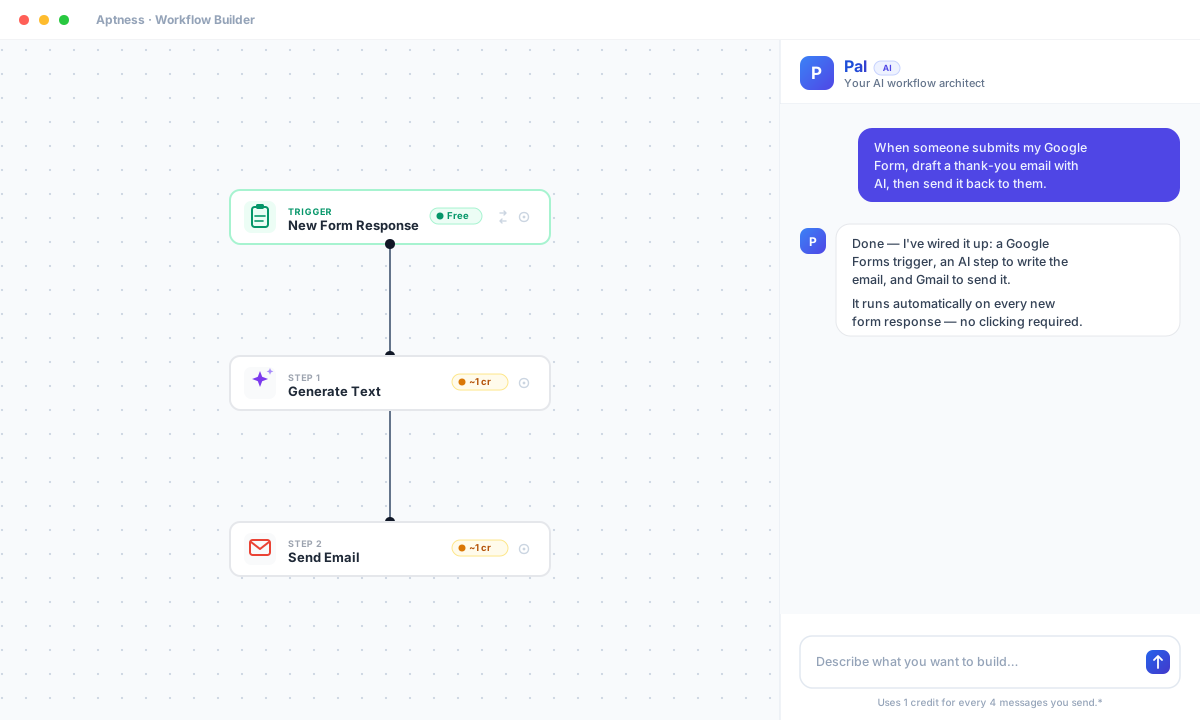
From a prompt to a working workflow
The idea is simple. Open the builder, describe what you'd like to automate, and Pal does the wiring.
"When someone submits my Google Form, draft a personalized thank-you email with AI and send it back to them."
From one sentence, Pal figures out the combination of tools your goal needs, adds them to the canvas, and connects them so they run one after another. It understands that order matters and that data flows between steps. In the example above it starts with a Google Forms trigger, then places the AI text-generation step before the send-email step — so the email is written first, then handed to Gmail to send.
It doesn't stop at simple chains, either. Pal can branch your workflow with conditions, repeat work with loops, and pull one tool's output into another's configuration. The result isn't a rough draft you have to untangle — it's a workflow that's already connected and configured, with each step explained back to you in plain language as it's added.
That's the difference between a chatbot that talks about automation and an assistant that actually builds it. You stay in the driver's seat, describing outcomes; Pal handles the plumbing.
Workflows that run themselves
Here's where it gets genuinely useful.
By default, every agent you build uses the Normal Trigger — it runs when you run it. That's perfect for on-demand tasks. But most automations are valuable precisely because you don't want to think about them. You want them to fire on their own.
Just tell Pal. Say you want your agent to kick in "whenever a new email arrives" or "every morning at 9," and Pal swaps the manual trigger for the right automatic one. The moment your workflow needs to run on something other than a button press, Pal reaches for the trigger that matches — so the workflow starts itself, no clicking required.
The automatic triggers Pal can wire up include:
- Gmail — a new email received, an email matching a search, a new labeled email, a new attachment, or a new sent email
- Google Drive, Sheets, Calendar, and Forms — react to new files, rows, events, and responses
- GitHub — respond to activity in your repositories
- Telegram — kick off on incoming messages
- Schedules — run hourly, daily, weekly, or monthly at a time you choose
So "email me a summary of today's calendar every morning" becomes a daily-schedule trigger. "Notify the team the moment an important email lands" becomes a Gmail trigger. You describe when it should happen, and Pal makes the workflow self-triggering. Set it up once, and it works while you're doing something else.
Simple, transparent pricing
Powerful assistants often come with confusing bills — token counters, per-message math, surprises at the end of the month. Pal doesn't work that way: using it costs just 1 credit for every 4 messages you send* — not per token, not per tool it adds to your canvas.
That keeps building a complete, self-triggering automation remarkably cheap, often just a credit or two — so you can go back and forth and refine without watching a meter spin.
Why it matters
Automation should feel like describing what you want, not engineering how to get it. Pal collapses the distance between the two:
- Describe it — say what you want in plain English.
- Pal builds it — the right tools, connected and configured, in the right order.
- It runs itself — Pal sets the trigger so your workflow fires automatically, on the event or schedule you choose.
- For next to nothing — roughly 1 credit per 4 messages, no token math.
The workflows were always possible. Pal just makes them something you can build in a sentence — and then forget about, because they're running on their own.
Start free and see it for yourself. Tell Pal what you'd like to automate, and watch your first self-triggering workflow come together in a few sentences — no wiring, no setup.
* Pricing is subject to change in line with our terms and conditions.
One short email. Every Friday.
New posts, product updates, and the most useful agent recipes from the community — handpicked by our team. No fluff, unsubscribe anytime.
No spam. Read by 12,000+ builders and operators.